![Eat App Logo - Small.png]](https://restaurant.eatapp.co/hs-fs/hubfs/Eat%20App%20Logo%20-%20Small.png?height=40&name=Eat%20App%20Logo%20-%20Small.png)
You can access the Reservation Settings in two ways:
- From the Admin page, go to Features → Settings → Reservations tab.
- From the Table Manager, go to Account Management → Concierge → Settings → Reservations tab.
Available Reservation Settings
Below are the reservation modification options you can configure for your venue:
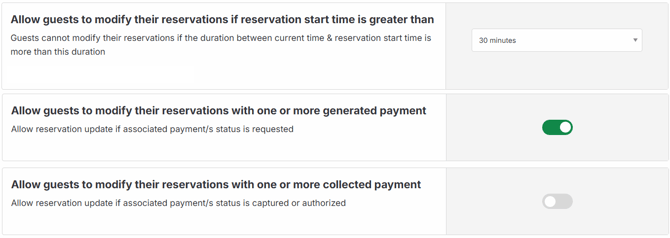
Allow guests to modify their reservations if reservation start time is greater than
Guests cannot modify their reservations if the duration between current time & reservation start time is more than this duration
- By default, this is set to 24 hours.
- This setting defines a time window within which guests are allowed to make changes to their upcoming reservation.
- For example, if set to 30 minutes, a guest can only modify their booking if the reservation is more than 30 minutes away. This helps prevent last-minute changes that are difficult to accommodate.
Set this to a duration that aligns with your kitchen prep or seating turnaround time where typically 30 to 60 minutes works well for most venues.
Allow guests to modify their reservations with one or more generated payment ✦
Allow reservation update if associated payment/s status is requested.
-
When enabled, guests can still modify their reservation even if a payment has been requested (i.e., the payment status is "generated" or pending). This is useful when you want to give guests flexibility to update details like party size, time, or date before payment is completed.
Allow guests to modify their reservations with one or more collected payment ✦
-
When enabled, guests can modify their reservation even after a payment has been captured or authorized. This provides the highest level of flexibility for guests who have already paid but need to make changes to their booking.
✦ Denotes new feature enhancements.
Note: Enabling these settings is recommended only if your refund or amendment policy supports it, as changes after payment capture may require manual payment adjustments on your end.