![Eat App Logo - Small.png]](https://restaurant.eatapp.co/hs-fs/hubfs/Eat%20App%20Logo%20-%20Small.png?height=40&name=Eat%20App%20Logo%20-%20Small.png)
This guide covers how loyalty rules work, how to set one up, where to track guest points, and how to see how your program is performing.
What can you do with the Loyalty Suite?
- Award points for visits and spend — Give guests points automatically every time they dine with you, or once they cross a spend threshold.
- Send vouchers and discounts — Reward loyal guests with a free item, a discount, or a VIP perk, assigned automatically.
- Message guests about their rewards — Let guests know how many points they have, or remind them to come back and redeem.
- Track loyalty activity per guest — See a guest's full points history and every reward they've earned in one place.
- Report on program performance — See points given, points redeemed, and how your loyalty program is trending over time.
How loyalty rules work
Loyalty runs on the same automation engine that powers the rest of Eat App, so if you've built an automation rule before, this will feel familiar. Every loyalty rule is made up of three parts:
Triggers — what needs to happen to kickstart the rule. For example:
- A reservation is created
- A guest is updated
- The rule runs on regular intervals
Conditions — what needs to be true before a guest earns or loses points. For example:
- A reservation status is "Completed"
- A guest's total spend crosses a set amount (with POS integration)
- A guest's visit count reaches a milestone (e.g. their 5th visit)
Actions — what happens once the conditions are met, such as:
- Add or deduct loyalty points
- Assign a voucher or discount
- Send an SMS/email/WhatsApp message letting the guest know
Combining conditions and actions is how you build a rule like "give guests 10 points every time they complete a reservation" or "send a free-dessert voucher on a guest's 10th visit."
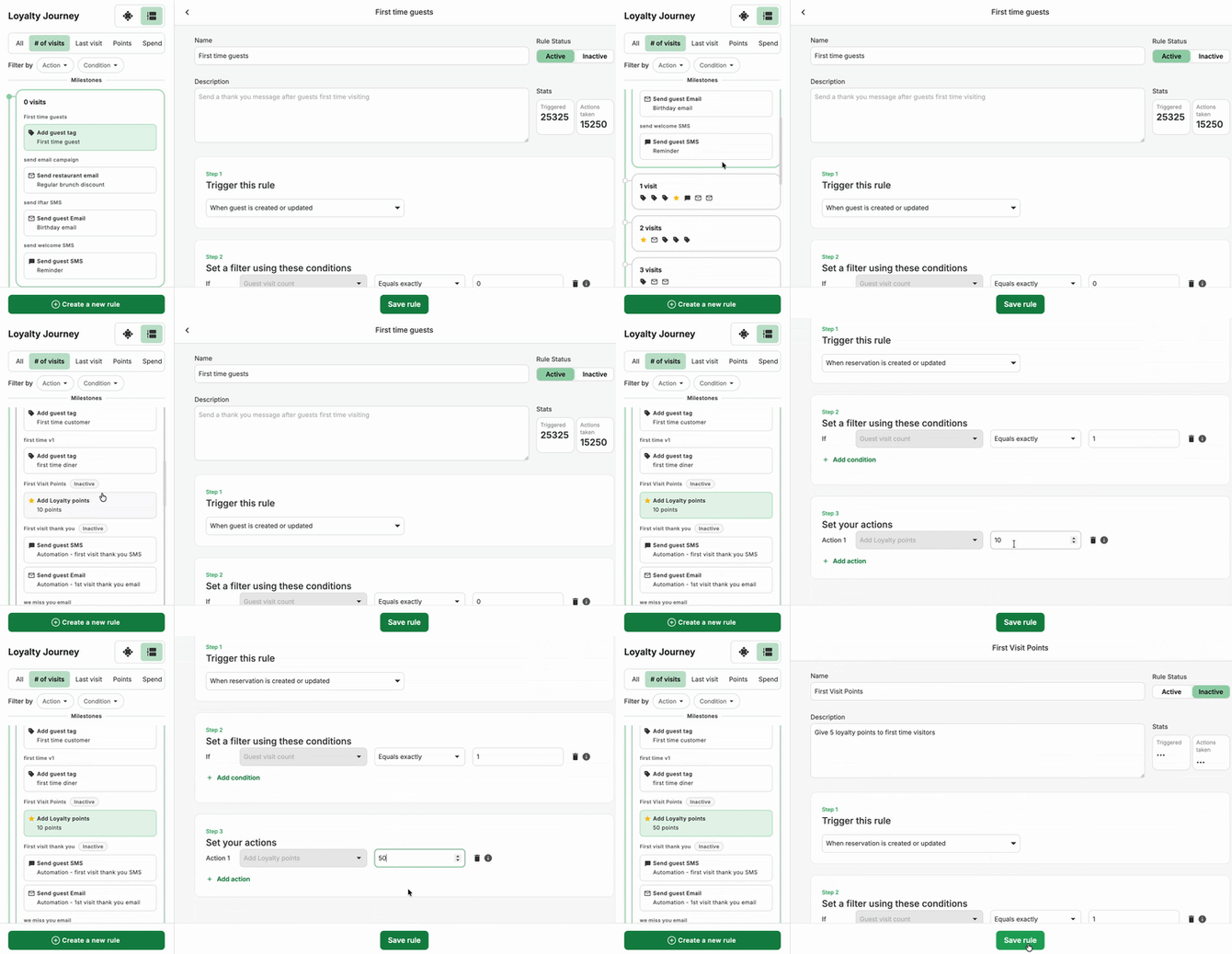
Setting up a loyalty rule
- Go to Marketing > Guest Loyalty
- Pick the rule type:
- Number of visits
- Time Since Last Visit
- Points
- Spend Amount
- Click on Create a new rule, or select an existing rule to edit. Give the rule a name (e.g. "Points per visit")
- Choose a Trigger — The rule can be triggered by Reservation or Guest updates, depending on what the rule should track.
- Add your Conditions — the criteria a guest or reservation needs to meet.
- Add your Actions — what should happen once those conditions are met (award points, assign a voucher, or send a message).
- Click Save Rule to save it.
You can turn any rule on or off at any time using the checkbox in the top right corner of the rule — no need to delete it.
Tip: Eat App comes with common loyalty rules ready to use out of the box, so you don't have to build your program from scratch. You can also fully customize your own using the automation builder above.
Tracking a guest's loyalty activity
Every guest profile has a Loyalty Timeline that lays out their loyalty journey chronologically — every milestone they've hit and every action (points, vouchers, or messages) tied to it. Open any guest's profile to see:
- Their current points balance
- Every milestone they've reached and which rule triggered it
- Whether the rule behind a milestone is still active (inactive rules are greyed out but stay visible for reference)
This is the fastest way to answer a guest's "how many points do I have?" question, or to see exactly why a particular reward was — or wasn't — issued.
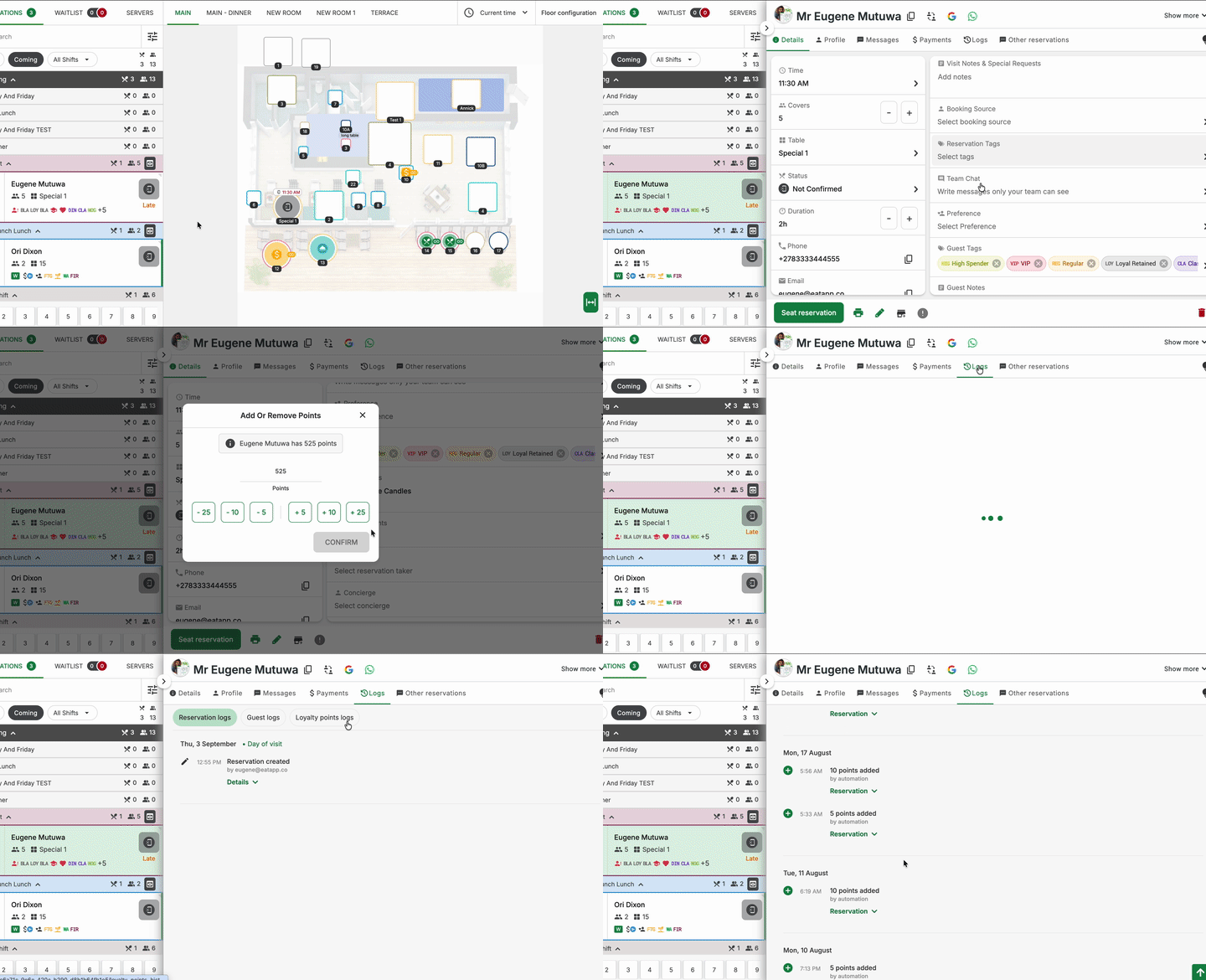
If you manage multiple locations under one guest record, group-level loyalty points are shown automatically when group view is turned on.
Reporting on your loyalty program
Head to Reports > Customer Loyalty to see how your program is performing at a glance, including:
- Total points given and redeemed
- Redemption rate
- Guest engagement trends over time
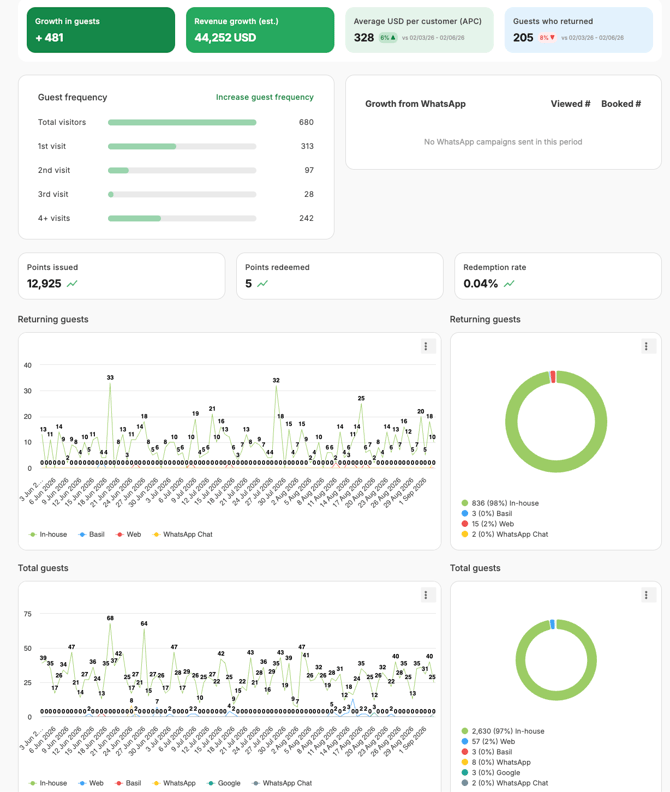
Use this report to spot whether your current rules are actually driving repeat visits, and to fine-tune point values or thresholds if engagement is low.
Frequently asked questions
Do I need POS integration to use loyalty? No, however, connecting your POS lets you automatically track guest spend in real time, which unlocks spend-based conditions (e.g. "award points after $50 spent") without manual entry.
Can I manually adjust a guest's points? Yes. You can edit a guest's loyalty points directly from their guest profile if you need to make a manual correction or one-off adjustment.
Will guests see their points anywhere? Guests don't have a self-serve points portal today, but you can message them their point balance and rewards directly using loyalty point variables in your SMS/email/WhatsApp templates.
Can I use my own external loyalty program instead? Yes — Eat App's loyalty tools work out of the box, or you can migrate your loyalty rules from your restaurant's existing loyalty system.
What happens if I turn a rule off? Guests keep any points or rewards they've already earned. The rule simply stops evaluating new reservations or guest activity going forward, and it'll show as inactive on the guest's Loyalty Timeline.